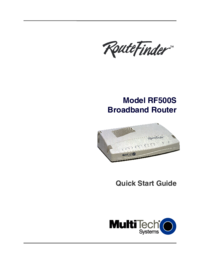
Multitech RF500S Uživatelský manuál
Procházejte online nebo si stáhněte Uživatelský manuál pro Síťové přepínače Multitech RF500S. Home Network 1 year Later Uživatelská příručka
- Strana / 49
- Tabulka s obsahem
- KNIHY


- Living with a SOHO Network 1
- 2001 edition 1
- The Joys of DSL and VPN 1
- Table of Contents 2
- 1 Overview 5
- 2.1 Dialup 7
- 2.2 DSL 7
- 2.3 Cable Modem 9
- 3 Dial Up – The Old Standby 10
- 4.2 Selecting a Provider 12
- 4.8 Turmoil in DSL Land 13
- 4.4 Optimization 13
- 4.5 Acceptable Use Policy 13
- 4.6 Privacy Policy 13
- 4.7 Service Level Agreement 13
- 5.4 Modem Access Adapter 16
- 5.5 Putting it all together 17
- 6 LAN -- The Networked Home 18
- 6.1.4 Structured Wiring 19
- 6.1.5 568A and 568B Pinnout 20
- 6.1.6 Patch Cables 20
- 6.1.7 Special Tools 20
- Purpose 20
- 6.1.8 Wiring Topology 21
- 6.2.1 PhoneLine Networking 22
- 6.2.2 RF Wireless 22
- 6.3 TCP/IP 23
- 6.4 IP Address 23
- 6.4.2 Subnet 23
- 6.4.3 Port Number 24
- 6.5 Private Addresses 24
- 6.6 LocalHost Address 25
- 6.7 Gateway 25
- 6.8 Name Resolution 25
- 6.9 Whois 25
- 6.11 Implementation 26
- 7.1 DSL Interface 27
- 7.2 Automatic Fail over 28
- 7.2.1 Using multiple ISPs 28
- 7.3 LAN Address Assignment 29
- 7.3.1 Dynamic 29
- 7.3.2 Static 29
- 7.4.1 Limitations of NAT 30
- 7.5 10/100 Ethernet switch 30
- 7.6 Virtual Private Network 30
- 7.7 Logging 31
- 8.1 PING 32
- 8.2 NET 33
- 8.3 NETSTAT 33
- 8.4 WINIPCFG 34
- 8.5 Trace Route 34
- 9 Browsing -- Wild Wild Web 35
- 11 Fax – E-mail on Paper 36
- 13.1 Real Audio 37
- 13.2 MP3 37
- 13.3 WMA 37
- 16.1 File Sharing 38
- 16.2 Atomic Time 38
- 16.3 Private Web Server 39
- 16.4 Local Weather Station 39
- 18 Backup – Oops Protection 40
- 18.2 Off Line Backup 41
- 19.1 Firewall 41
- 19.2 Anti Virus Software 41
- 19.4 Spyware 42
- 19.5 Configuration 42
- 19.6 Social Engineering 42
- 20.1 At the Office 43
- 20.2 At the Home Office 44
- 20.3 On the Road 44
- 22.1 Naming Convention 46
- 22.5 Site Logs 47
- 23 Conclusions 48
- Happy networking 48
- Last Page 49
- Intentionally Blank 49
Shrnutí obsahu
Living with a SOHO Network 2001 edition The Joys of DSL and VPN Tom Schmidt Schmidt Consulting Revised 3/25/2001 [email protected] http://w
6 When the time is up the user is unceremoniously disconnected just like a dialup user. This allows more customers to be serviced from the same size
7 Windows performance Tip - in dial up networking uncheck "Log on to Network." Most ISP use RADIUS authentication, eliminating Windows netw
8 4.2 Selecting a Provider Our first attempt was Verizon. Our central office is equipped with Verizon DSL but we did not qualify. No reason was give
9 4.4 Optimization Did the speed tweaks on DSL Reports. Depending on overall network conditions the Speed Test Center indicate 488kbp/s down and 490
10 5 Telco Wiring -- Getting Connected All our communication services are delivered via Telco twisted pair wiring. Verizon provides three phone line
11 5.1 Network Interface Device Back in the dark old days when the phone company rented you a phone and did all the inside wiring they made no provi
12 5.3 Secondary Lightning Protection The phone company provides lighting protection as part of the Network Interface Device. This is primarily desi
13 The Modem Access Adapter was published as a Design Idea in the July 22, 1999 issue of EDN. A theory of operation, schematic diagram, parts list a
14 6 LAN -- The Networked Home The Local Area Network (LAN) allows computers to be used anywhere in the house. Each computer has access to shared re
15 6.1.2 10Mbps - 100Mbps - 1Gbps - 10Gbps Initially UTP Ethernet ran at 10 million bits per second. Fast Ethernet increased speed to 100 million bi
ii Table of Contents 1 OVERVIEW ...
16 6.1.5 568A and 568B Pinnout A cause of much confusion when implementing structured wiring is the fact that two different connector pinnouts were
17 6.1.8 Wiring Topology UTP Ethernet uses a point-to-point topology. Each Ethernet outlet must be directly connected to a hub port. The hub regener
18 The situation is more difficult for existing homes without network wiring. Most folks want to share a single Internet connection, and perhaps a pr
19 6.3 TCP/IP The LAN uses the Internet Protocol (IP) to connect local devices. Using the same communication protocol for the LAN and the Internet
20 6.4.3 Port Number A single computer may be connected to multiple hosts over the Internet. How does the computer know how to deliver each packet?
21 6.6 LocalHost Address 127.0.0.1 is a reserved loopback address. This is useful for testing to makes sure everything in the computer is working co
22 Windows Security Tip – File and print sharing is a much-debated topic. By default file and print sharing is configured to be accessible to all in
23 7 Broadband Router – One Address So Many Computers When the LAN was first set up we used proxy software running on a laptop. This allowed multipl
24 7.2 Automatic Fail over When a client on the LAN requests Internet access the router verifies the DSL connection is working. If it is bad the rou
25 foolproof since IP addresses can be spoofed, so caution is still advised. Both solutions eliminate the need to reconfigure anything during fail ov
iii 6.8 NAME RESOLUTION ...21 6
26 7.4.1 Limitations of NAT As useful as NAT is it is also controversial. It breaks the end-to-end paradigm of the Internet. The NAT device is requi
27 host on the corporate network the VPN authentication box pops up, once authenticated the VPN encrypts data flowing between the user’s computer and
28 8.1 PING PING is a command line utility to determine if a remote machine is reachable. The host is specified by either IP address or domain name.
29 8.2 NET NET is a command line utility to display information about Windows networking and workgroup NET CONFIG Displays your current workgroup s
30 8.4 WINIPCFG In versions of Windows versions WINIPCFG displays the current configuration for each network adapter. In Windows 2000 use the IPCON
31 where the site is located and who owns it. This information is then displayed on a map to show overall routing. Typical TRACERT report: Tracing
32 10.2 POP Mail E-mail has a sending component, SMTP, and a mailbox part POP. When you compose and send e-mail your mail program connects to the S
33 This works well for the limited number of faxes we use. 12 USENET News – Unfiltered Opinion Most ISPs carry USENET news groups. USENET gives you
34 The printer is a HP 2000 using a HP JetDirect 300X print server. Many different print servers are on the market. The print driver runs on the mac
35 maintain a number of public timeservers. Tardis uses this information to set the local server’s Real Time Clock (RTC). Tardis includes a Network T
iv 18.2 OFF LINE BACKUP ...37
36 This is a 4-port device. Currently port 1 is connected to a desktop and port 2 to the server. The other two ports are for future expansion. Swi
37 We are still experimenting with backup software, one of the things we want to do is to backup and synchronize a desktop and laptop. One of the pro
38 19.4 Spyware Companies find every more clever ways to obtain customer information. This has led to a technique called spyware. Software you ins
39 One of the reasons to convert from proxy based Internet sharing to NAT was to eliminate the need to configure applications for each location. NAT
40 20.2 At the Home Office At home when the laptop is connected to the SOHO LAN it is primarily used to copy files to and from the laptop. Addres
41 VPN provides secure remote access to corporate shares. Commonly used shares are mapped as desktop shortcuts. Opening a share automatically activat
42 Using a hosting service means web traffic does not have to be granted access to your network. Internet traffic that originates within the LAN is a
43 22.3 WHOIS record for Tschmidt.com Registrant: Schmidt Consulting (TSCHMIDT-DOM) 95 Melendy Road Milford, NH 03055 US Domain Name:
44 22.6 E-mail An advantage of having your own domain name is that email is addressed to your domain not your ISP. This personalizes your web presen
45 Last Page Intentionally Blank
1 1 Overview In mid 1998 I set up a home LAN. I was starting a consulting business and wanted to learn more about the issues involved in building an
2 Figure 1 SOHO data and voice block diagram
3 2 Internet Access – Your Friendly Internet Service Provider The reason most often cited to purchase a PC is for Internet access. The PC has progre
4 POTS (Plain Old Telephone Service) phone and high-speed data service. Filters split the signals inside the residence. Low frequencies are delivered
5 2.3 Cable Modem The cable TV industry is being very aggressive delivering high-speed data. Historically Cable TV was a one-way medium. TV signals
Další dokumenty pro Síťové přepínače Multitech RF500S
Související produkty a manuály pro Síťové přepínače Multitech RF500S
 (99 stránky)

 (160 stránky)
© 2020, manymanuals.cz. Všechna práva vyhrazena. | 0.053 s |
 Manymanuals.com
 Manymanuals.de
 Manymanuals.fr
 Manymanuals.it
 Manymanuals.pl
 Manymanuals.cz
 Manymanuals.es
 Manymanuals-pt.com
Komentáře k této Příručce